![main logo with tagline dark background.png]](https://faq.digitaljoy.media/hs-fs/hubfs/main%20logo%20with%20tagline%20dark%20background.png?height=40&name=main%20logo%20with%20tagline%20dark%20background.png)
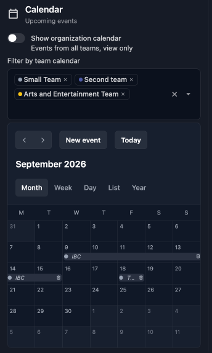
The Calendar widget ("Upcoming events") lets you view and manage your schedule across multiple views (Month, Week, Day, List, and Year). You can customize and navigate your view using the following controls:
- Organization Calendar Toggle: Switch on Show organization calendar to display view-only events from all teams.
- Filter by Team Calendar: Select or remove specific team tags (e.g., Small Team, Second team, Arts and Entertainment Team) to filter which calendars appear, with color-coded dots distinguishing each team.
- Event Bars: Scheduled events and multi-day spans (such as IBC) appear directly on the calendar grid as horizontal bars marked with their corresponding team color dot.
- Navigation & Creation: Use the < > arrows to move between dates, click Today to jump back to the current date, or click New event to add an item to the schedule.